Notion AI security & privacy practices
At Notion, we want to be transparent with our customers about our products and how we use AI to enhance our users’ experience. Below is an overview of Notion AI functionality and related AI governance, security and privacy practices.
At Notion, we want to be transparent with our customers about our products and how we use AI to enhance our users’ experience. Below is an overview of Notion AI functionality and related AI governance, security and privacy practices.
For further information see:
Permissions are respected: Notion AI can only ever use content you give it access to.
By default, your customer data is not used to train models.
The current AI provider list with access to Customer Data is always up to date on our Subprocessor page.
Independently certified: Notion AI is in scope for our SOC 2 Type 2 report and ISO 27001 certification and we require equivalent standards from our third-party providers.
Which AI Providers does Notion use?
Notion AI runs on a mix of large language models (LLMs).
Some models are made available to Notion directly by the company that built them; others are served to us through inference providers (for example, a model may be accessed via a specialized infrastructure provider rather than the model's original author). Whether a provider is engaged directly or as an inference provider, all are bound by the same contractual commitments including our no-training and data-handling requirements.
We review providers and models regularly to give you the best experience, so this list changes over time. For that reason, we keep the authoritative, current list on our Subprocessor page rather than here. For each provider, that page shows what their purpose is and where they process data.
See the Data Processing Addendum for details.
How Notion AI uses your Workspace Content
When Notion AI answers a question using your workspace, two things happen:
Finding relevant content:
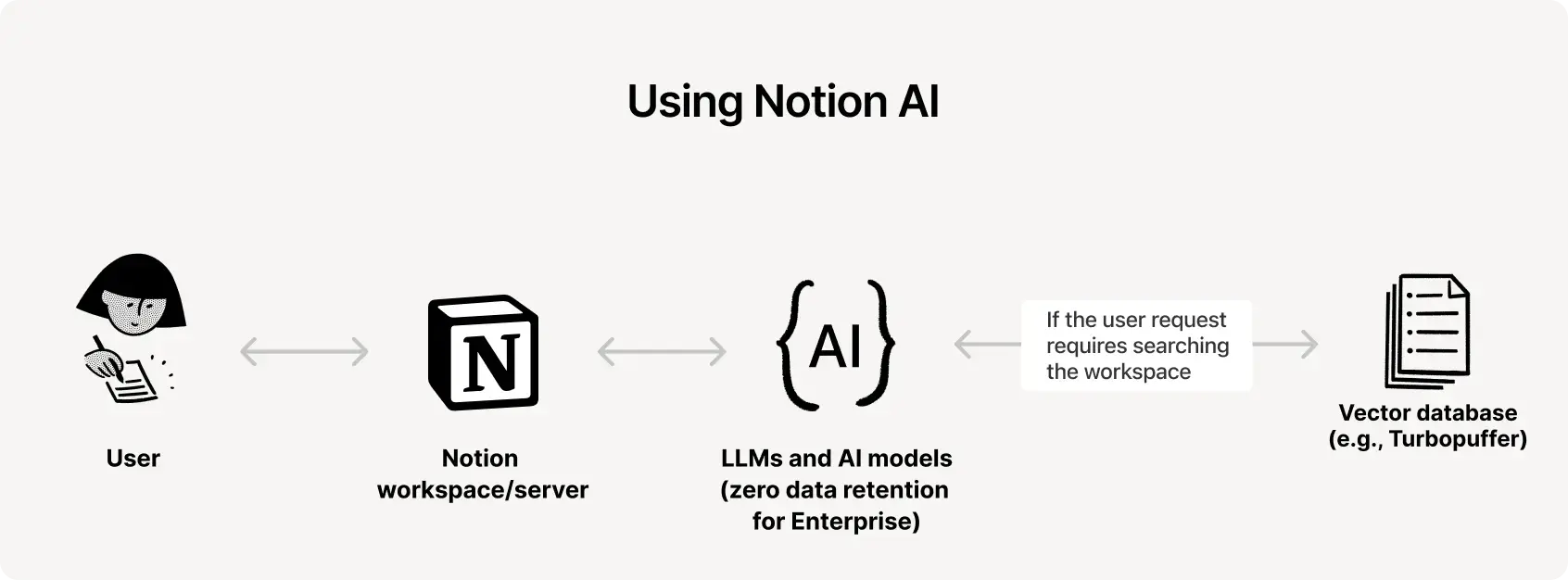
Notion looks through a searchable representation of your pages called an index so it can locate the pages most relevant to your request.
When the user submits a message, Notion creates an embedding for the message so that it can be used to search against the page index.
Generating a response: Those relevant pages and your request are sent to the LLMs, which generate the answer.
Both steps honor your existing permissions and all of the data protections described within.
What are Embeddings?
An embedding is a numerical representation of text that captures its meaning, so pages on similar topics sit close together and can be matched quickly to a request.
How Embeddings are Created and Stored
Notion generates an embedding for each page using zero-retention LLMs.
Embeddings for each workspace are logically separated each other.
Embeddings are stored in a vector database (currently Turbopuffer) optimized for fast, relevant lookups. Any vector database we use is vetted by our security team and is independently audited against SOC 2 Type 2.
How a Response is Generated
Notion receives your request.
It's passed to the LLMs. If no workspace search is needed, the response is generated and returned. If a search is needed, the LLMs generate a search query.
The query runs against the vector database to find candidate pages.
Those pages are ranked and refined for relevance.
The LLMs generate a response from your request and the ranked pages.
Notion formats the output and displays it to you.
Notion AI respects your existing permissions: The models used to generate a response for you cannot see or use any content you don't already have access to. Notion AI never widens your access.
Always true, for every model: By default, neither Notion nor our AI providers use your Customer Data to train any models. Our contracts with AI providers prohibit them from using your data to train their models, and your use of Notion AI grants Notion no right or license to use your data to train ours. This prohibition on training applies to every provider in the chain: it flows through to both the provider or inference provider that hosts or serves the model, and is enforced through written data-processing agreements with each.
Retention when using Notion AI:
Enterprise customers - Varies by model: Most models we use offer zero data retention (ZDR), meaning they process your data only to generate a response and keep nothing afterward. A small number of models don't offer zero data retention. When you use one of those models, your data may be retained by the provider for a limited period solely to deliver the response. These models are off by default and the workspace owner must opt in to use these models.
Free, Plus, and Business: AI provider retains your data for 30 days or fewer, then deletes it.
There are certain AI-powered features that may require the use of data-retaining LLMs; in such cases, Notion will make available Workspace settings to enable administrators to turn on data-retaining LLMs.
External Agents: Different controls apply. See External Agents.
Deleting and Restoring your Data
Delete a page or workspace and you can restore it within 30 days. After 30 days, deleted content is unrecoverable and moves into permanent deletion in line with the retention policies outlined in our Data Processing Addendum. For more information, see: How to delete or restore.
Embeddings are deleted within 60 days of the page or workspace being deleted.
You own your input and output: Notion doesn't claim ownership of what you put into Notion AI or what it generates. As further described in the Notion AI and Notion Credit Supplementary Terms, your Input and Output are your Customer Data.
Rules for using Notion AI: The Notion AI and Notion Credit Supplementary Terms and Notion's Content & Use Policy apply. Violating them can result in removal of content or suspension of access to your workspace.
Encryption in transit: Whenever Customer Data is sent to a provider, it's encrypted using TLS 1.2 or greater.
Customer segregation: Each customer's workspace data is logically separated in production. We do not mix or process workspace data from different customers together. We do not expose your data to other customers.
Provider vetting: Before engaging any subprocessor, we review their privacy, security, and confidentiality practices and enter into a written agreement that imposes data protection obligations consistent with our commitments to you, as described in our Data Processing Addendum.
Further information can be found on:
Notion AI is included in the scope of Notion's SOC 2 Type 2 report and ISO 27001 certification. For workspaces with zero data retention in effect, our providers' zero-retention APIs support HIPAA-compliant workflows.
Learn more